

Configuration
Configure Odoo ERP integration to access CRM, sales, inventory, and business data. The toolkit enables search, create, update, and manage records.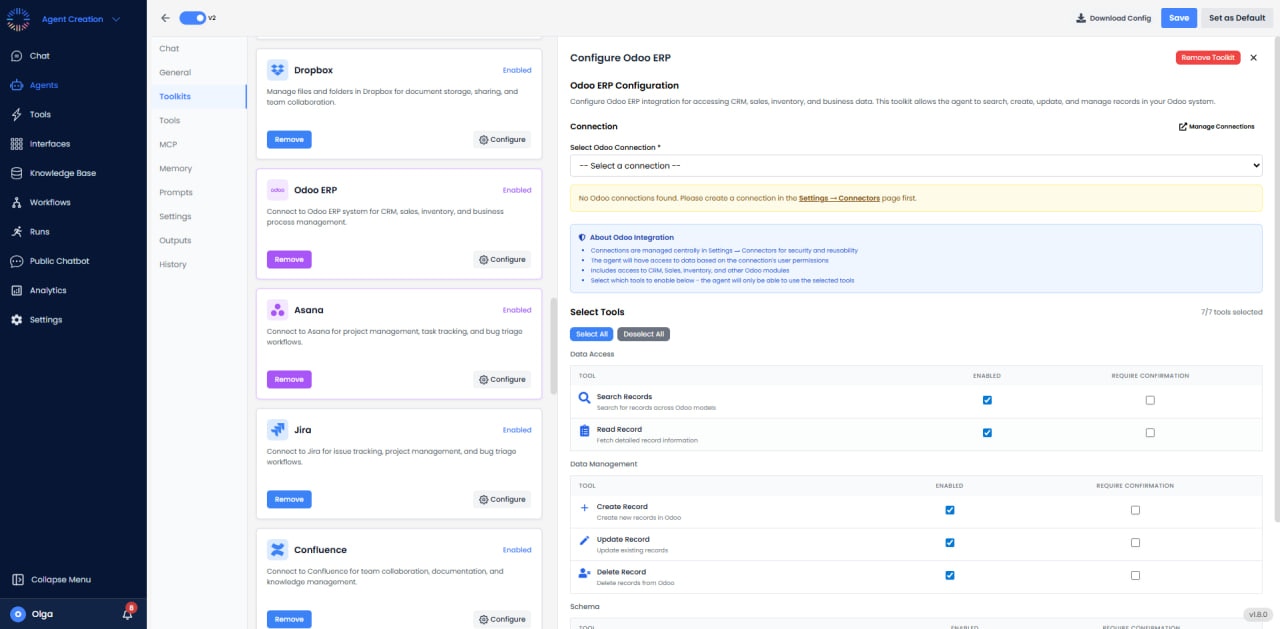

- Connection: No Odoo connections found. Please create a connection in the Settings → Connectors page first.
- Access: ERP capabilities including inventory, sales, purchasing, accounting, and HR management.
- Supports: Odoo SaaS and self-hosted (12+).
Available Tools (7/7)
- Search Records: Query any Odoo model with filters.
- Read Record: Retrieve record data by IDs.
- Create Record: Insert new records.
- Update Record: Modify existing records.
- Delete Record: Remove records from system.
- List Models: View available Odoo models.
- Helpdesk (Create Ticket): Create support tickets.
Use Cases
- Inventory Management: Real-time stock tracking and warehouse optimization.
- Sales Order Processing: Automated order creation.
- Automated Invoicing: Generate and send invoices.
- Purchase Automation: Create purchase orders automatically.
- Reporting: Extract financial, sales, or inventory data.
Best Practices
- Use External IDs: Assign external IDs to records for stable cross-system references.
- Batch Operations: Use search_read and write on multiple IDs to reduce API calls.
- Field Selection: Always specify fields to read rather than retrieving all fields.
- Domain Filters: Use efficient domain expressions for searches ([(‘field’, ‘operator’, ‘value’)]).
- Context Usage: Pass appropriate context for multi-company, language, or special behavior.
- Error Handling: Check workflow states before calling action methods (confirm, validate).
Common Models
- sale.order - Sales Orders
- purchase.order - Purchase Orders
- res.partner - Customers/Suppliers
- product.product - Products
- stock.picking - Delivery/Receipt Orders
- account.move - Invoices/Bills
- account.payment - Payments
- stock.quant - Inventory Quantities
Common Issues & Solutions
- Access Denied: User lacks access rights for model. Check security groups and permissions.
- Validation Error: Required fields missing or workflow state incorrect. Review model constraints.
- Record Not Found: Verify record ID exists and user has read access.
- Method Not Found: Ensure method exists on model and is callable via XML-RPC.