

Configuration
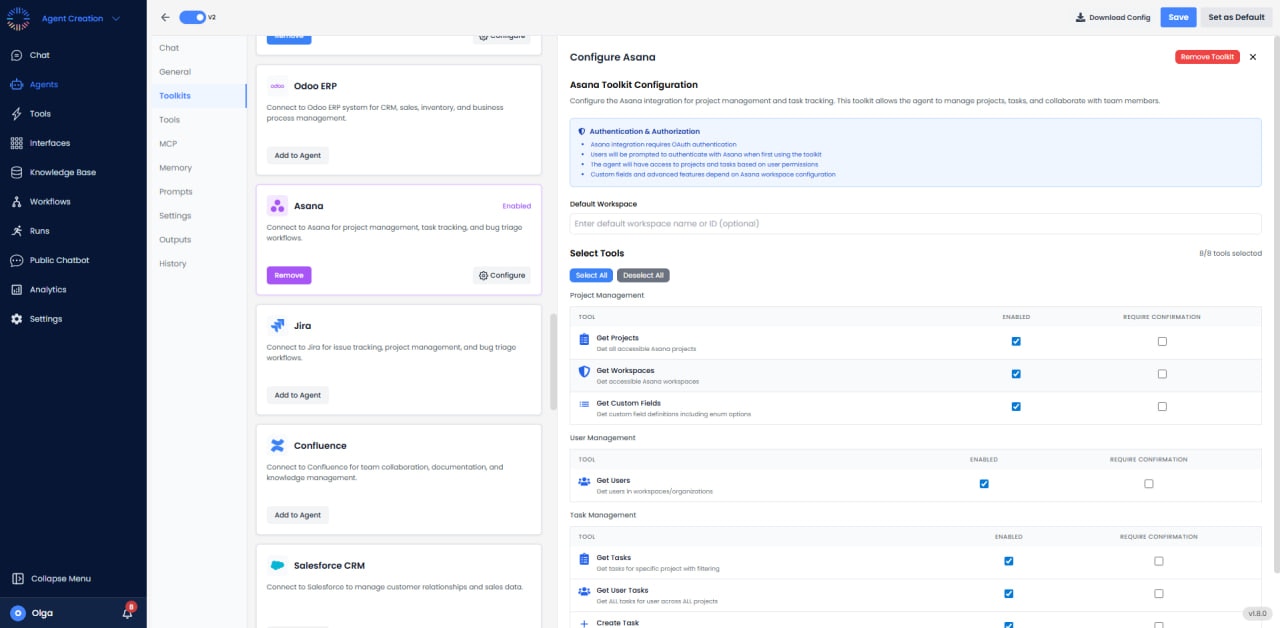

- Authentication: OAuth
- Default Workspace: Optional configuration
- Access: Full read/write access to tasks, projects, and workspaces
Available Tools (8/8)
- Get Projects: List all projects in the workspace.
- Get Workspaces: List all workspaces accessible to users.
- Get Custom Fields: Retrieve custom fields defined in workspace or project.
- Get Users: List all users in the workspace.
- Get Tasks: Query tasks by project, assignee, or due date.
- Get User Tasks: Retrieve tasks assigned to specific user.
- Create Task: Create tasks with name, assignee, due date, and description.
- Update Task: Modify task properties including status and assignee.
Use Cases
- Task Management: Automatically create tasks from emails or customer requests.
- Project Tracking: Monitor project progress and send status updates.
- Automated Task Creation: Generate recurring tasks for workflows.
- Status Reporting: Query task completion rates and generate reports.
- Sprint Planning: Create and organize tasks for development sprints.
Rate Limits
Monitor HTTP 429 responses and implement retry-after delays. Use pagination for large result sets (default: 100 items per page).Common Issues & Solutions
- Task Not Found: Verify task GID is correct and user has access to the task’s project.
- Permission Denied: Ensure user has appropriate project access level (commenter, editor, admin).
- Custom Field Errors: Verify custom field type matches value being set (number, text, enum).
- Rate Limit: Implement exponential backoff and respect Retry-After header in 429 responses.