

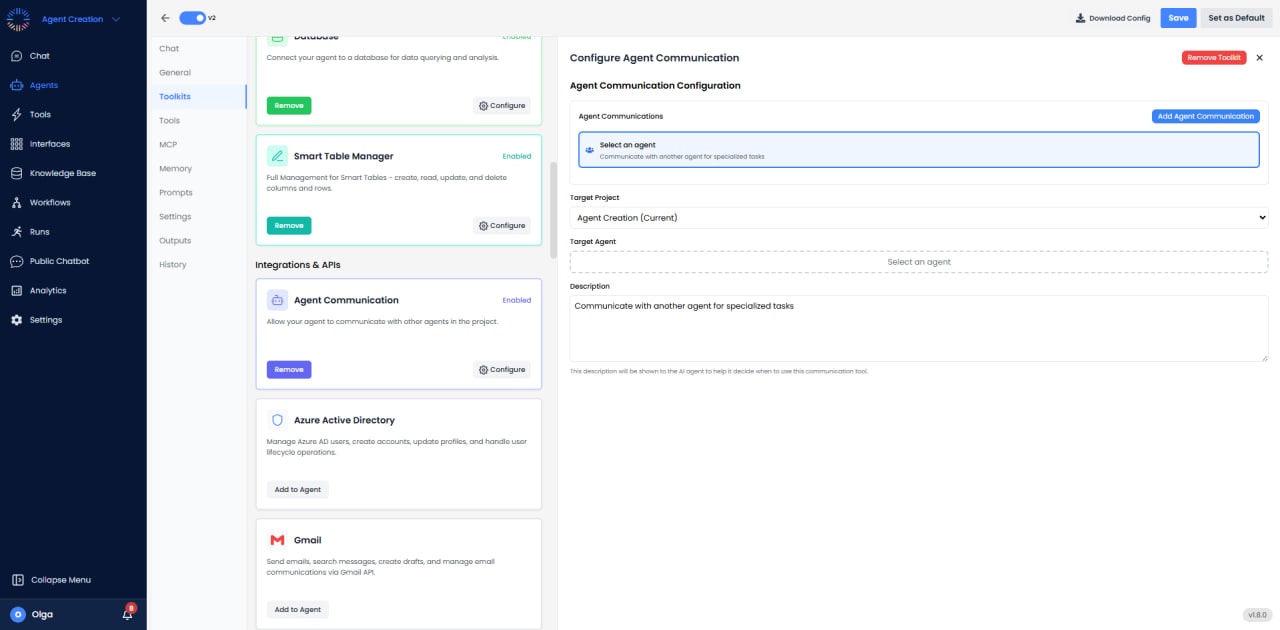
What Is It?

The Agent Communication toolkit lets your agent talk to other agents in your project (or across projects) so they can work together. It has three tools: Message Agent, Delegate Task, and Agent Status.

Message Agent

When to Use

Use the Message Agent when your agent needs input, answers, or expertise from another agent to complete its task. For example:
  • A customer support agent needs a product specialist agent to answer a technical question.
  • A reporting agent needs a data analysis agent to pull and summarize numbers from a database.
  • A general-purpose agent needs a domain expert agent to verify or enrich its response.

How to Use

  • In the Agent Builder, add the Agent Communication toolkit to your agent.
  • Click Add Agent Communication and select the target agent you want to communicate with.
  • Write a clear description that tells your agent when to reach out, e.g., “Use this agent when the user asks about product specifications or compatibility.”
  • Enable the Message Agent tool in the tool selector.
At runtime, your agent will automatically send a message to the target agent when the situation matches the description. The target agent processes the message using its own tools and knowledge, and sends a response back. Your agent then uses that response to continue the conversation.

Delegate Task

When to Use

Use Delegate Task when your agent receives a request that is better handled entirely by another specialized agent. Instead of trying to answer itself, the agent hands off the task. For example:
  • A front-desk agent receives a request to generate an invoice - it delegates the task to a billing agent.
  • A manager agent receives a data cleanup request - it delegates to a data processing agent.
  • A triage agent categorizes incoming requests and delegates each one to the right specialist agent.

How to Use

  • Add the Agent Communication toolkit and configure a target agent (same steps as Message Agent above).
  • Enable the Delegate Task tool in the tool selector.
  • In the description, explain what kind of tasks should be delegated to this agent, e.g., “Delegate all invoice generation and billing-related tasks to this agent.”
At runtime, when the agent encounters a task matching the description, it delegates the task to the target agent and returns the result.

Agent Status

When to Use

Use Agent Status when your agent needs to check on another agent before deciding to communicate or delegate. For example:
  • Before delegating a long-running task, the agent checks whether the target agent is available.
  • In a multi-step workflow, the agent checks the status of a previous step handled by another agent before proceeding.

How to Use

  • Add the Agent Communication toolkit and configure a target agent.
  • Enable the Agent Status tool in the tool selector.
At runtime, the agent can check the status of the target agent and decide its next action based on the result.

Things to Keep in Mind

  • An agent cannot communicate with itself - the system prevents this to avoid infinite loops.
  • Each target agent is limited to 25 tool calls per message, and the overall limit across all agent communications in a single turn is 100 tool calls.
  • The description you provide is critical - it is what the AI reads to decide when to use the tool. Make it specific and clear.
  • You can enable confirmation policies on any tool if you want the user to approve the action before it runs.