

Authentication & Setup
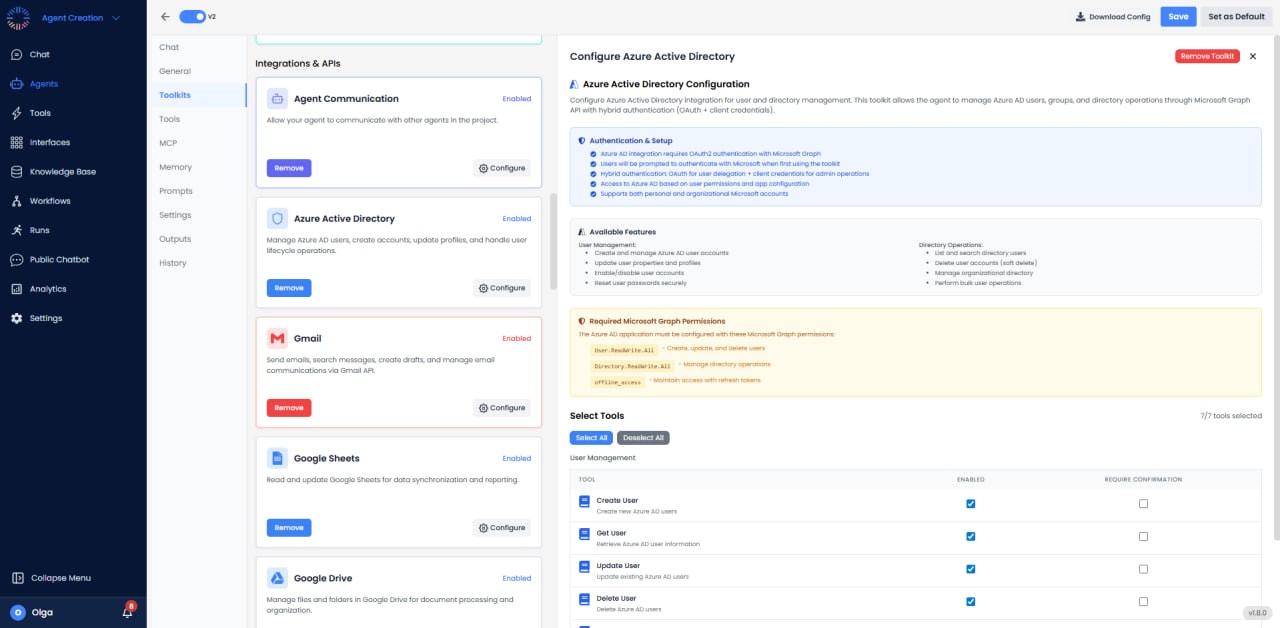

Required Application Permissions
- User.ReadWrite.All: Create, read, update, and delete user accounts.
- User.Read.All: Read-only access to user profiles.
- Group.ReadWrite.All: Manage group memberships and properties.
- Directory.ReadWrite.All: Full directory access for advanced operations.
- UserAuthenticationMethod.ReadWrite.All: Manage MFA and auth methods.
Available Operations
With all required permissions configured, the toolkit enables the following operations:User Management
- Get User: Retrieve user profile including email, name, department, job title, manager.
- List Users: Query all users with filtering by department, location, or custom attributes.
- Create User: Provision new user accounts with UPN, display name, password, and licenses.
- Update User: Modify user properties including department, phone, title, office location.
- Delete User: Remove user accounts (soft delete; recoverable for 30 days).
- Restore User: Recover soft-deleted users from the recycle bin.
- Get User Photo: Retrieve user profile photos.
- Set User Photo: Upload profile photos for users.
Password Management
- Reset Password: Force password reset and send temporary password.
- Force Password Change: Require password change at next sign-in.
- Set Password: Set specific password for user account.
- Get Password Policies: Retrieve password complexity and expiration settings.
Account Control
- Disable Account: Block user sign-in without deleting account.
- Enable Account: Re-enable disabled user accounts.
- Revoke Sessions: Force sign-out from all active sessions and refresh tokens.
- Block Sign-In: Prevent specific users from accessing resources.
License Management
- Assign License: Allocate Office 365, Microsoft 365, or Azure licenses to users.
- Remove License: Deallocate licenses from users.
- Get User Licenses: View all licenses assigned to users.
- List Available Licenses: Query organization’s license pool and availability.
- Batch License Assignment: Assign licenses to multiple users simultaneously.
Group Operations
- Create Group: Create security groups, Microsoft 365 groups, or distribution lists.
- Get Group: Retrieve group details including members and owners.
- List Groups: Query all groups with filtering.
- Update Group: Modify group properties.
- Delete Group: Remove groups from directory.
- Add User to Group: Grant group membership to users.
- Remove User from Group: Revoke group membership.
- List Group Members: Get all users in a group.
- List Group Owners: View group administrators.
Directory Roles
- Assign Role: Grant administrative roles (Global Admin, User Admin, etc.).
- Remove Role: Revoke administrative privileges.
- Get User Roles: View all roles assigned to users.
- List Available Roles: Query directory role templates.
Manager Relationships
- Get Manager: Retrieve user’s direct manager.
- Set Manager: Assign manager to user.
- Remove Manager: Clear manager assignment.
- Get Direct Reports: List all users reporting to a manager.
Authentication Methods
- Get Auth Methods: View configured MFA methods (phone, email, authenticator).
- Add Auth Method: Register new authentication methods.
- Remove Auth Method: Delete authentication methods.
- Reset MFA: Clear MFA registration forcing re-enrollment.
Configuration Options
- Default Domain: Set primary domain for new user creation.
- Password Complexity: Configure minimum password requirements.
- License Defaults: Auto-assign specific licenses to new users.
- Group Templates: Standard groups to add new users to.
Use Cases
- User Onboarding: Automate new employee provisioning including account creation, license assignment, and group membership.
- Offboarding: Disable accounts, revoke licenses, and remove group memberships for departing employees.
- Password Resets: Self-service password reset workflows triggered by support tickets.
- License Management: Optimize license allocation based on usage and reclaim unused licenses.
- Security Auditing: Monitor admin role assignments and privileged access.
- Bulk Operations: Mass user updates for organizational changes (department moves, title changes).
- Compliance Reporting: Generate user access reports for compliance audits.
- HR Integration: Sync user data between HR systems and Azure AD.
Best Practices
- Use Service Principal: Create dedicated app registration rather than using personal accounts.
- Least Privilege: Grant minimum required permissions for operations.
- Admin Consent: Ensure tenant admin grants consent for application permissions.
- Error Handling: Handle concurrent modification conflicts gracefully.
- Batch Operations: Use batch endpoints for bulk user operations.
- Audit Logging: Log all user management operations for compliance.
Security Considerations
- Store client secret securely; rotate regularly (max 2-year expiration).
- Monitor app sign-ins and API usage in Azure AD audit logs.
- Implement approval workflows for sensitive operations (role assignments, deletions).
- Use conditional access policies to protect admin operations.
Common Issues & Solutions
- Insufficient Privileges: Verify app has required Application permissions with admin consent.
- License Not Available: Check organization’s license pool before assignment.
- UPN Conflict: Ensure unique User Principal Name when creating users.
- Immutable ID: Cannot modify immutableId on cloud-only accounts.