

RAG Technology Explained
When you upload a file to the platform, it is processed through a sophisticated pipeline. First, text extraction pulls raw text from PDFs, DOCX, and other formats, applying OCR to scanned images if necessary. Next, chunking splits the text into smaller, manageable segments. Then, embedding converts each chunk into a vector (a list of numbers representing meaning) using an embedding model. Finally, storage saves these vectors in a vector database. When an agent searches, the query is also embedded, and the database finds the chunks with the closest mathematical proximity (meaning) to the query.Configuration Panel
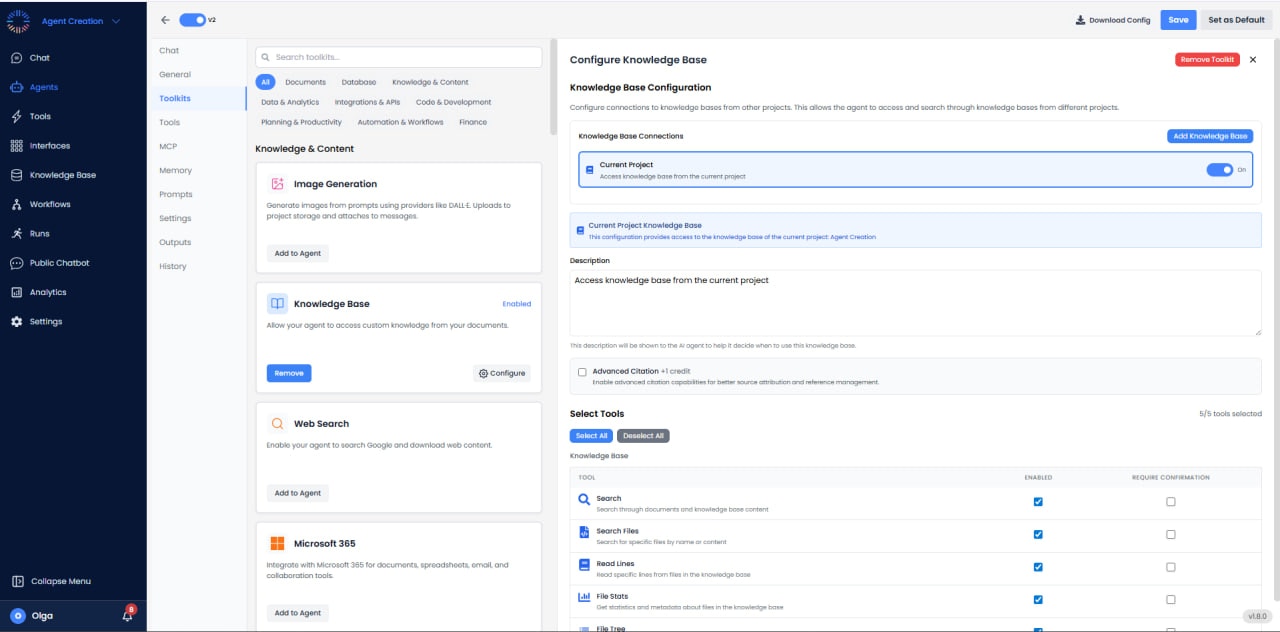
- Current Project Knowledge Base: Enabled by default, granting access to files in the current workspace.
- Cross-Project Access: Allows linking KBs from other projects (e.g., a central “Company Policies” project).
- Description: Metadata describing the KB contents helps the agent decide when to use this tool.
- Advanced Citation (+1 credit): If enabled, the agent provides rigorous inline citations linked to the source text.
Available Sub-tools
- Search Tool: The primary tool for semantic retrieval. Finds relevant information even if keywords don’t match exactly.
- Search Files Tool: A metadata search for finding specific files by name rather than content.
- Read Lines Tool: Extracts raw text from a specific file. Useful when the agent needs to read a whole chapter or section in detail.
- File Stats Tool: Returns metadata: file size, author, creation date, page count.
- File Tree Tool: Lists the directory structure. Essential for agents to explore a new KB and understand file organization.
Implementation Examples
- Resume Screening: Agent searches for “Python experience” across all uploaded PDFs, retrieves relevant chunks from different resumes, and summarizes top candidates.
- Policy QA: User asks “Can I expense a taxi?”. Agent searches “Travel Policy”, finds the ground transport section, and answers “Yes, if it is for client travel, per section 4.2.”
- Technical Support: Agent searches technical manuals to find error codes and troubleshooting steps.