

Configuration Options
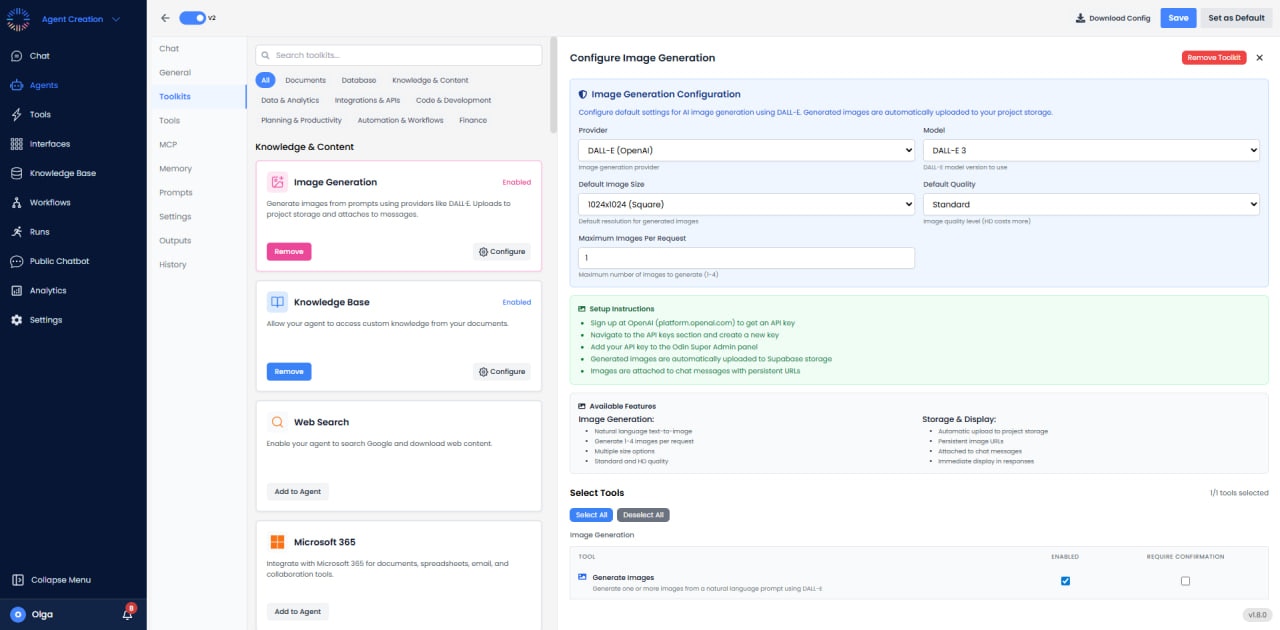
- Provider: DALL-E (OpenAI) - The AI image generation provider.
- Model: DALL-E 3 - The model version used for image generation.
- Default Image Size: Choose from 1024x1024 (Square), 1024x1792 (Portrait), or 1792x1024 (Landscape).
- Default Quality: Standard (faster, lower cost) or HD (more detailed, higher cost).
- Maximum Images Per Request: Generate 1-4 images at once (set range 1-4).
Image Size Options
Available Tools
The Image Generation Toolkit provides one tool that can be enabled or disabled:- Generate Images: Generate one or more images from a natural language prompt using DALL-E. This tool can be configured to require user confirmation before execution.
Storage & Display
- Automatic Upload: Generated images are automatically uploaded to your project storage.
- Persistent URLs: Images receive permanent URLs for reliable access.
- Chat Integration: Images are attached to chat messages and displayed immediately in responses.
Prompting Best Practices
- Be specific about style, lighting, and composition (e.g., “shot from above with natural sunlight”).
- Use descriptive adjectives (e.g., “cinematic lighting,” “hyper-realistic,” “minimalist,” “vintage”).
- Avoid vague terms like “cool” or “nice” - instead describe exactly what you want.
- Iterate on prompts based on generated results - refine and adjust for better output.
- Specify perspective and framing (e.g., “close-up portrait,” “wide-angle landscape,” “bird’s eye view”).
- Include art style references when helpful (e.g., “in the style of Art Nouveau,” “watercolor painting”).
- Mention mood and atmosphere (e.g., “mysterious,” “cheerful,” “dramatic,” “serene”).
- For technical diagrams, be precise about layout and elements required.
Use Cases
- Marketing: “Generate 5 concepts for our new sneaker ad campaign.”
- Storyboarding: “Create a scene showing a cyberpunk city in rain.”
- Web Design: “Generate a placeholder hero image for a gardening website.”
- Presentations: “Create an illustration representing ‘Cloud Security’ for my slide deck.”