

Sub-tools
- Web Search Tool: Executes a query against a search engine (Google/Bing) and returns the SERP with titles, snippets, and URLs. Best practice is “multi-hop” searching where the agent refines terms and searches again if initial results are inconclusive.
- Get Content Tool: Visits a specific URL and scrapes the main text content. Uses a headless browser to render JavaScript, ensuring it can read dynamic modern websites, stripping ads and navbars to return clean text.
Configuration & Security
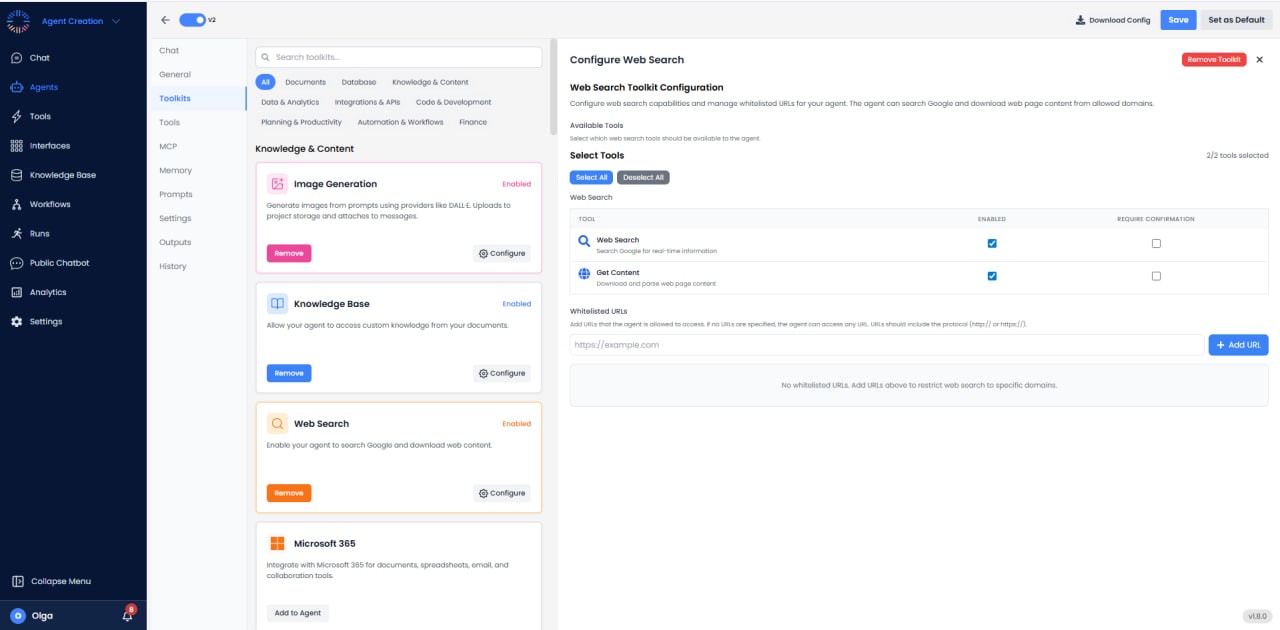
- Whitelisted URLs: Administrators can restrict the agent to specific domains by adding whitelisted URLs. If no URLs are specified, the agent can access any URL. URLs should include the protocol (http:// or https://). This helps ensure information quality by limiting the agent to trusted sources.
Practical Examples
- Competitive Intelligence: “Search for the pricing page of Competitor X and summarize their enterprise tier features.”
- News Monitoring: “Find the latest regulatory changes regarding AI in the EU published in the last week.”
- Fact Checking: “Verify if the quote attributed to Lincoln is real.”