> ## Documentation Index
> Fetch the complete documentation index at: https://learn.getodin.ai/llms.txt
> Use this file to discover all available pages before exploring further.
# Salesforce CRM
> CRM data and operations
## Configuration
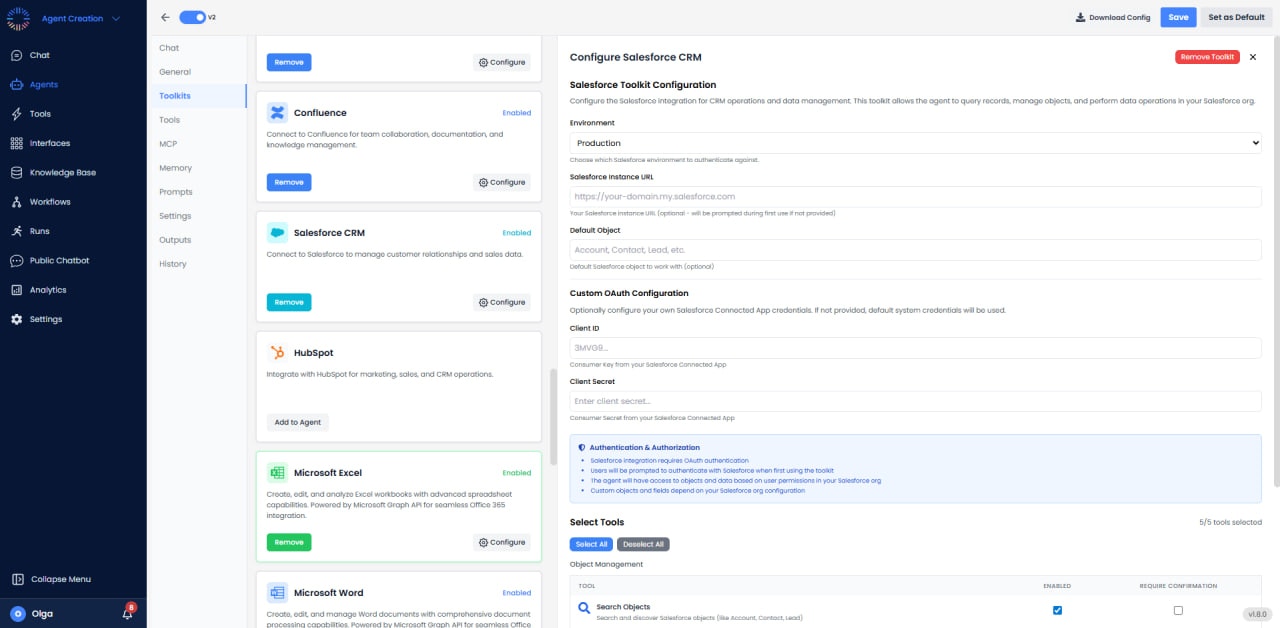
 * **Environment**: Production
* **Instance URL**: [https://your-domain.my.salesforce.com](https://your-domain.my.salesforce.com) (optional; prompted on first use)
* **Default Object**: Account, Contact, Lead, etc.
* **Custom OAuth**: Client ID: 3MVG9..., Client Secret: Enter client secret...
* **Authentication**: OAuth; data access based on user permissions
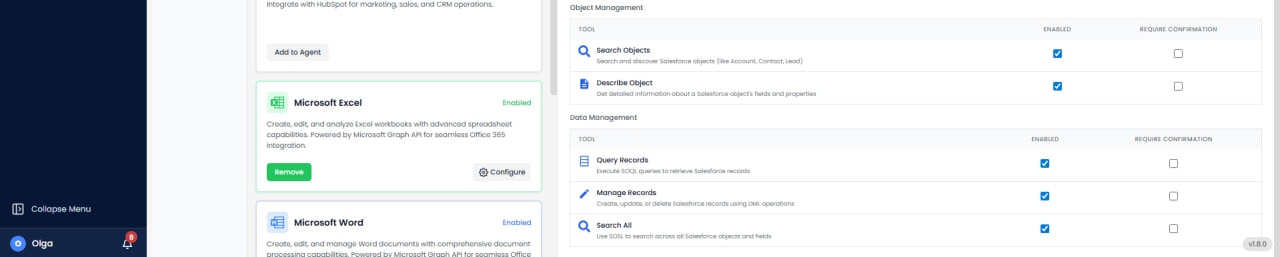
## Available Tools (5/5)
* **Search Objects**: Find records across standard and custom objects.
* **Describe Object**: Get schema information for any object.
* **Query Records**: Execute SOQL queries to retrieve records.
* **Manage Records**: Create, update, or delete records.
* **Search All**: Perform full-text searches across multiple objects.
## Use Cases
* **Lead Enrichment**: Automatically enrich leads with research and company data.
* **Opportunity Management**: Track deals through pipeline and forecast revenue.
* **Automated Lead Routing**: Assign leads based on territory or lead score.
* **Customer Data Sync**: Synchronize data between Salesforce and other systems.
* **Case Automation**: Auto-create support cases and update statuses.
## API Limits & Quotas
Salesforce enforces API call limits based on edition and license type. Professional: 1,000 calls/day, Enterprise: 5,000+ calls/day, Unlimited: 10,000+ calls/day. Monitor usage in Setup → System Overview → API Usage. Use bulk operations to maximize efficiency.
## Common Issues & Solutions
* **API Limit Exceeded**: Implement caching, use bulk operations, or request limit increase from Salesforce.
* **Invalid Field**: Verify field API names (often differ from display labels). Check field-level security.
* **Record Type Mismatch**: Ensure correct record type ID when creating records with multiple record types.
* **Validation Rules**: Failed saves may be due to Salesforce validation rules. Review error messages carefully.
* **Environment**: Production
* **Instance URL**: [https://your-domain.my.salesforce.com](https://your-domain.my.salesforce.com) (optional; prompted on first use)
* **Default Object**: Account, Contact, Lead, etc.
* **Custom OAuth**: Client ID: 3MVG9..., Client Secret: Enter client secret...
* **Authentication**: OAuth; data access based on user permissions
## Available Tools (5/5)
* **Search Objects**: Find records across standard and custom objects.
* **Describe Object**: Get schema information for any object.
* **Query Records**: Execute SOQL queries to retrieve records.
* **Manage Records**: Create, update, or delete records.
* **Search All**: Perform full-text searches across multiple objects.
## Use Cases
* **Lead Enrichment**: Automatically enrich leads with research and company data.
* **Opportunity Management**: Track deals through pipeline and forecast revenue.
* **Automated Lead Routing**: Assign leads based on territory or lead score.
* **Customer Data Sync**: Synchronize data between Salesforce and other systems.
* **Case Automation**: Auto-create support cases and update statuses.
## API Limits & Quotas
Salesforce enforces API call limits based on edition and license type. Professional: 1,000 calls/day, Enterprise: 5,000+ calls/day, Unlimited: 10,000+ calls/day. Monitor usage in Setup → System Overview → API Usage. Use bulk operations to maximize efficiency.
## Common Issues & Solutions
* **API Limit Exceeded**: Implement caching, use bulk operations, or request limit increase from Salesforce.
* **Invalid Field**: Verify field API names (often differ from display labels). Check field-level security.
* **Record Type Mismatch**: Ensure correct record type ID when creating records with multiple record types.
* **Validation Rules**: Failed saves may be due to Salesforce validation rules. Review error messages carefully.