> ## Documentation Index
> Fetch the complete documentation index at: https://learn.getodin.ai/llms.txt
> Use this file to discover all available pages before exploring further.
# Agent Templates
> Get Started With Our Pre-Built Agents
Odin AI's **Agent Templates** provide a fast, structured way to launch intelligent agents without starting from zero. Each template comes with **predefined behaviors, toolkits, and best practices** designed for specific workflows–whether it's knowledge retrieval, data analysis, research, project management, or automation. You can customize templates to control how agents respond, what data they access, and which models they run on, giving you both **speed to deployment** and **fine-grained flexibility**.
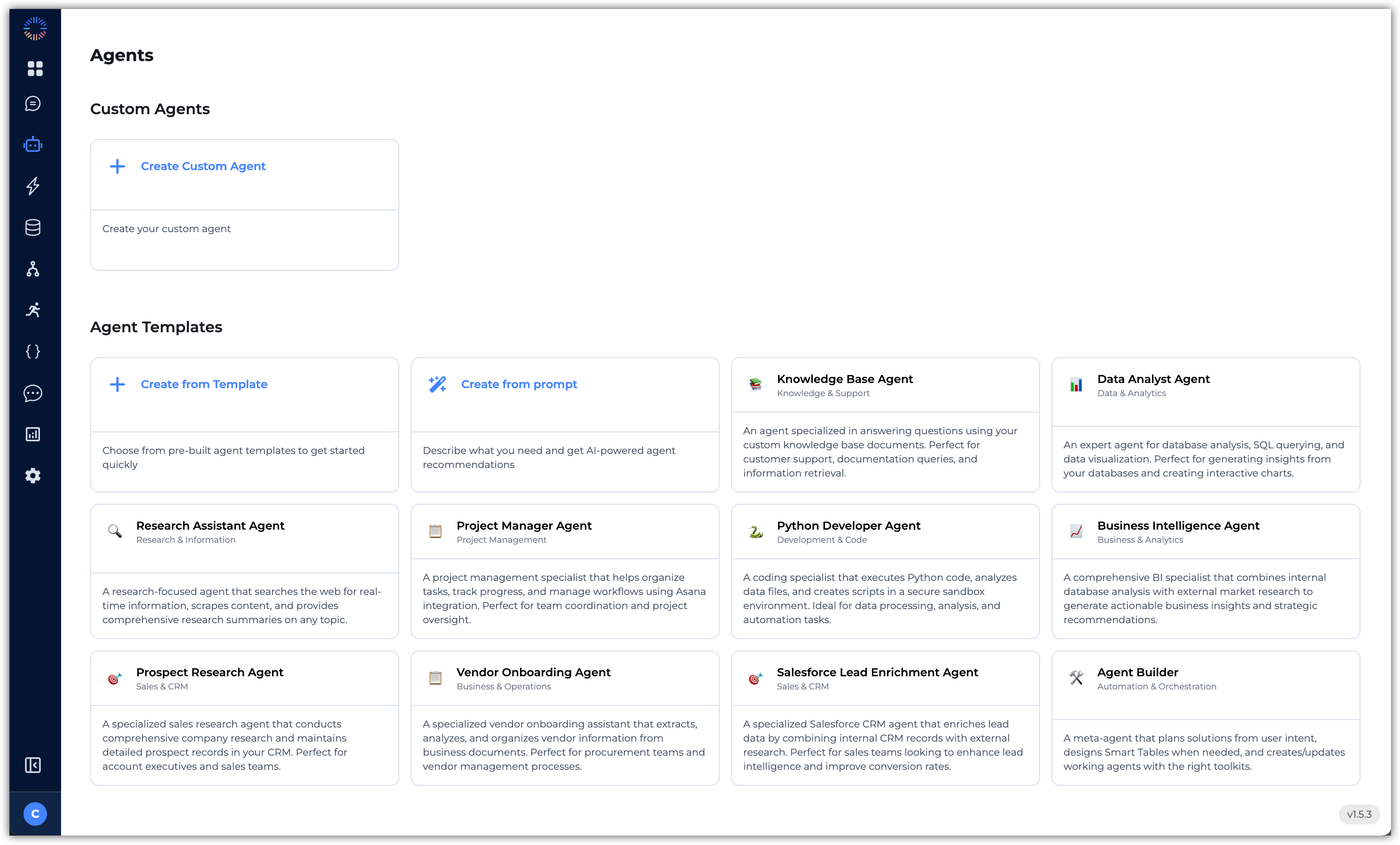
To access the available Agent Templates, navigate to **Agents** within your Odin AI project. Within the Agents' section, you'll find the various pre-built Agent Templates and the option to use AI to design an agent based on what you need. These are the available templates:
The Knowledge Base Agent is a pre-built AI agent designed to help users retrieve information from your knowledge base. It prioritizes accuracy, transparency, and usability, making it a solid starting point for teams building internal support or informat
### Core Capabilities
* **Search-first workflow** – queries the knowledge base before generating responses
* **File operations** – supports:
* `Search` to find relevant information
* `Search Files` to locate documents by name
* `Read Lines` to extract surrounding context from a file
* **Answer Quality** – concise, sourced responses with enough detail to be useful
* **Fallback behavior** – clearly states when information is not available
* **Disambiguation** – prompts users for clarification when requests are ambiguous
### Use Cases
* Internal knowledge base assistants
* Document retrieval and summarization bots
* Templates for custom enterprise agents
### Why Use This Template?
* Provides a **tested framework** for knowledge retrieval agents
* Ensures **consistent answer quality** (accurate, sourced, transparent)
* Reduces build time by giving you a **ready-to-extend foundation**
The Data Analyst Agent is a pre-built AI agent designed for SQL-driven data exploration and visualization. It helps users write efficient queries, interpret results, and generate clear visual outputs to support decision-making.
### Core Capabilities
* **Schema-first workflow** – always examines database schema before query generation
* **SQL query generation** – writes efficient, well-structured queries tailored to user needs
* **Analytical reasoning** – explains methodology and approach behind each analysis
* **Visualization support** – creates relevant charts (Pie, Bar, Line) to illustrate insights
* **Iterative analysis** – suggests follow-up queries or deeper analysis when appropriate
* **Best practices** – follows standard guidelines for query design, data validation, and interpretation
### Tool Support
* `List Tables` – view all available tables
* `Database Schema` – inspect table structures and relationships
* `Database Query` – execute SQL queries and return results
* `Pie Chart`, `Bar Chart`, `Line Chart` – visualize query results
* `List Smart Tables` and `Describe Table` – work with Smart Tables for advanced analysis
### Use Cases
* Interactive SQL assistants
* Internal data exploration and reporting tools
* Dashboards and visualization-driven analytics agents
* Prototyping data analysis workflows with LLMs
### Why Use This Template?
* Provides a **ready-to-use framework** for SQL-based analysis
* Combines **querying + explanation + visualization** in one agent
* Ensures responses are transparent, validated, and user-friendly
* Reduces development effort by giving teams a **scaffolded analytics assistant**
The Research Assistant Agent is a pre-built AI agent designed for gathering, analyzing, and summarizing information from the web. It emphasizes accuracy, transparency, and timeliness, making it a strong foundation for research-driven use cases.
### Core Capabilities
* **Current information retrieval** – always searches for the most up-to-date data available
* **Cross-referencing** – compares multiple sources to validate accuracy
* **Source transparency** – provides citations and direct links to referenced material
* **Summarization** – distills complex or lengthy information into accessible insights
* **Critical analysis** – highlights potential biases or limitations in sources
* **Exploration support** – suggests related research directions for deeper inquiry
### Tool Support
* `Web Search` – query Google for relevant, up-to-date information
* `Get Content` – download and parse full page content for analysis
### Use Cases
* Market and industry research
* Competitive analysis
* Knowledge gathering for reports, briefs, or presentations
* Fact-checking and validation workflows
* Prototyping external research agents
### Why Use This Template?
* Provides a **ready-to-deploy framework** for web-based research assistants
* Ensures findings are **accurate, sourced, and easy to consume**
* Builds trust by including **citations and attribution**
* Reduces development overhead with a **pre-structured, extensible design**
The Project Manager Agent is a pre-built AI agent designed to help teams organize, track, and complete their work efficiently in Asana. It supports task management, progress tracking, and team coordination to improve productivity and streamline workflows.
### Core Capabilities
* **Project structure awareness** – understands workspaces, projects, and team organization
* **Task management** – creates clear, actionable tasks with owners, deadlines, and details
* **Progress tracking** – reviews task status and identifies bottlenecks
* **Team coordination** – facilitates communication and workload balancing across members
* **Process improvements** – suggests best practices for workflow optimization
* **Documentation** – keeps projects organized with updated task and project records
### Tool Support
* `Get Workspaces`/`Get Projects` – understand project structure
* `Get Tasks` – review current tasks and statuses
* `Create Task` – add new tasks with details, assignments, and deadlines
* `Update Task` – modify or track progress on existing tasks
* `Get Users` – identify team members and roles
* `Get User Tasks` – review individual workloads and responsibilities
### Use Cases
* AI-powered project management in Asana
* Automated task creation and progress updates
* Team workload visibility and balancing
* Workload optimization through best practices
* Extensible foundation for productivity-focused agents
### Why Use This Template?
* Provides a **ready-to-use framework** for building Asana-based project assistants
* Ensures **clear, organized, and actionable task management**
* Improves productivity through **progress tracking and bottleneck detection**
* Reduces time-to-value with a **tested, extensible foundation** for project management workflows
The Python Developer Agent is a pre-built AI agent designed to write, execute, and explain Python code for **data processing, analysis, and automation**. It helps users solve problems, create scripts, and analyze data while following best practices for code quality and reliability.
### Core Capabilities
* **Code generation** – writes clean, well-structured, and documented Python code
* **Testing & validation** – executes and verifies code before providing final solutions
* **Data analysis** – leverages common libraries such as `pandas`, `numpy`, and `matplotlib`
* **Error handling** – produces informative error messages and handles exceptions gracefully
* **Code explanation** – clearly describes logic, approach, and implementation details
* **Performance optimization** – balances efficiency with readability and maintainability
### Tool Support
* `Search Files` – locate files or documents for analysis
* `Upload File` – bring new files into the Python environment
* `Execute Code` – run Python scripts in a secure sandbox
* `List Files` – view available files for processing
* `Create Download URL` – generate links for downloading processed files
### Use Cases
* Data processing pipelines
* Exploratory data analysis
* Report generation and automation scripts
* File transformations and conversions
* Rapid prototyping or Python-based workflows
### Why Use This Template?
* Provides a **tested foundation** for Python-based automation and analysis agents
* Ensures solutions are **safe, efficient, and well-document**
* Combines **code execution + explanation** for clarity and trust
* Reduces setup time with a **pre-built environment for code and file handling**
The Business Intelligence Agent is a pre-built AI agent that combines **internal database analysis** with **external market research** to generate actionable business insights and strategic recommendations. It's designed to support decision-making by blending operational performance data with broader industry and competitive context.
### Core Capabilities
* **Business context awareness** – tailors analysis to objectives and strategic goals
* **Integrated analysis** – mergers internal performance metrics with external market data
* **Visualization & reporting** – produces clear, actionable charts, dashboards, and reports
* **Trend identification** – highlights patterns, opportunities, and risks across data sources
* **Strategic recommendations** – translates insights into business-focused actions
* **Market awareness** – factors in competitor landscape and industry dynamics
### Analysis Workflow
1. **Internal Data Analysis** – query databases to assess business performance
2. **Market Research** – gather external insights on trends, competitors, and conditions
3. **Data Processing** – integrate and analyze all sources using Python
4. **Strategic Insights** – synthesize findings into clear recommendations for stakeholders
### Tool Supports
#### Database Analysis
* `List Tables`/`Database Schema` – understand data structure
* `Database Query` – extract business metrics
* `Pie Chart`, `Bar Chart`, `Line Chart` – create quick visualizations
#### Market Intelligence
* `Web Search` – discover industry trends and competitor information
* `Get Content` – parse detailed market research sources
#### Advanced Analytics
* `Upload File` – import external datasets for analysis
* `Execute Code` – perform advanced modeling, statistical analysis, and visualization
* `Create Download URL` – deliver reports and dashboards
* `Search Files` – access historical reports and business documents
### Use Cases
* Executive dashboards and strategy reports
* Market trend and competitor analysis
* Revenue and performance forecasting
* M\&A and investment decision support
* Integrated BI + research workflows
### Why Use This Template?
* Provides a **complete BI workflow** (internal + external analysis in one agent)
* Ensures outputs are **strategic, data-driven, and actionable**
* Reduces development time with a **ready-to-extend foundation**
* Bridges the gap between **business performance tracking** and **market intelligence**
The Prospect Research Agent is a pre-built AI agent that conducts comprehensive company research and maintains detailed prospect records in your CRM. It blends web intelligence (site, pricing, news) with structured CRM checks to produce a standardized research report and keep records clean.
### Core Capabilities
* **CRM duplicate detection** – flexible name matching (`ILIKE`), prior to insert
* **Company profiling** – website/product scan, pricing intel, recent news
* **Signal harvesting** - growth indicators, tech stack, decision makers
* **Standardized report output** – consistent, actionable format every time
* **CRM write-backs** – insert/update prospect data with strict column quoting
* **Sales alignment** – value prop suggestions tied to your services
### Research Workflow
1. **CRM Check** – query CRM for existing records (use `ILIKE` to catch variants).
2. **Company Research** – find site > parse product/company info.
3. **Pricing Intelligence** – locate pricing page > extract/structure/tiers.
4. **News & Intelligence** – pull recent announcements, launches, funding.
5. **Research Report** – draft using a standard format.
6. **CRM Update** – insert or update prospect records; avoid duplicates.
### Tool Support
#### Web Research
* `Web Search` – discover website, pricing, news
* `Get Content` – fetch and parse target pages for details
#### CRM Management
* `Database Query` – check for existing records, insert/update data
* Always wrap column names in double quotes
* Use `ILIKE` for name matching
* Check for duplicates before insert
* If **no response** after `INSERT`, treat as success
### Key Focus Areas
* **AI Automation Opportunities** – manual/legacy workflows ripe for automation
* **Company Scale** – headcount, geography, ACV potential
* **Technology Stack** – current tools, platforms, integrations
* **Growth Indicators** – funding, hiring, expansions, launches
* **Decision Makers** – roles/titles relevant to your motion
### Use Cases
* Outbound prospecting & ABM research
* Pipeline hygiene (dedupe, enrichment, updates)
* SDR/AE pre-call briefs and talk-track prep
### Why Use This Template?
* Ships a **repeatable research flow** + CRM discipline out of the box
* Produces **actionable, standardized reports** aligned to your services
* Minimizes duplicate records and manual CRM cleanup
The Vendor Onboarding Agent is a pre-built AI agent that streamlines the onboarding of new vendors by extracting, validating, and organizing information from uploaded business documents. It provides complete vendor profiles, risk assessments, and database-ready outputs to support procurement workflows.
### Core Capabilities
* **Email drafting** – composes professional communications for vendor onboarding
* **Document analysis** – reviews uploaded forms, contracts, insurance certificates, and tax docs with exhaustive search methods
* **Information extraction** – captures financial, compliance, operational, and contact data
* **Data organization** – structures findings to align with vendor table schema and business requirements
* **Vendor profiling** – generates profiles with summaries, risk factors, and qualification assessments
### Workflows
1. **Document Intake** – begin systematic analysis immediately upon file upload
2. **Exhaustive Search** – scan across all uploaded docs for comprehensive detail
3. **Cross-Reference** – validate consistency across multiple documents
4. **Categorize Findings** – organize data into financial, compliance, operational, and contact sections
5. **Database Update** — populate or update vendor records in structured tables
6. **Vendor Summary** – deliver profile with highlights, risk indicators, and readiness assessment
### Key Focus Areas
* **Financial stability** – revenue, credit ratings, banking relationships
* **Compliance status** – certifications, insurance coverage, safety history
* **Operational capabilities** – services, equipment, geographic coverage
* **Contact \* org structure** – leadership, departments, key contacts
* **Risk factors** – red flags and qualification thresholds
### Tool Support
#### Document Analysis
* `Search` – scan vendor documents for specific details
* `Search Files` – locate and analyze specific document types
#### Vendor Intelligence
* `Web Search` – gather missing information (e.g., EIN lookup if absent in documents)
* `Get Content` – extract details from vendor's official website or filings
#### Database Management
* `Database Query` – check existing vendor records
* `Add Row` – create new vendor entries
* `Edit Row` – update existing vendor records (always using the `id` column)
* `List Smart Tables`/`Describe Table` – understand database schema and relationships
### Use Cases
* Vendor onboarding and due diligence
* Procurement compliance checks
* Supplier risk profiling
* Automated vendor database population
* EIN number verification and enrichment
### Why Use This Template?
* Ensures **comprehensive onboarding** with minimal manual input
* Produces **database-ready vendor records** aligned to business schema
* Increases accuracy by **cross-referencing multiple sources**
* Provides **actionable risk and qualification insights** for procurement teams
The Salesforce Lead Enrichment Agent is a pre-built AI agent that enhances **Salesforce lead data** with external research, turning incomplete records into **comprehensive, actionable profiles**. It combines CRM querying with web research to give sales teams intelligence that drives relevance and confidence in outreach. Its core mission is to transform basic lead records into **research-backed profiles** that reveal company context, growth signals, decision-makers, and engagement opportunities.
### Tool Support
* **Salesforce Operations**:
* `Search Objects`, `Query Records`, `Manage Records`, `Search All`
* **External Research**:
* `Web Search`, `Get Content`
### Workflow
1. Analyze existing CRM records to identify gaps
2. Research company websites, news, funding, tech adoption
3. Update CRM with enriched data and research notes
4. Provide **qualification score** and outreach recommendations
### Focus Areas
* Company intelligence (size, revenue, growth, decision makers)
* Market context (trends, competitors, challenges)
* Engagement opportunities (pain points, timing signals, case studies)
### Use Cases
* Enrich Salesforce leads with company size, tech stack, and key contacts
* Add market context: funding, expansions, product launches, and trends
* Score and qualify leads to prioritize outreach
* Provide tailored recommendations for sales messaging and timing
### Why Use This Template?
* Combines **CRM data + external research** in one workflow
* Ensures leads are **accurate, enriched, and sales-ready**
* Provides **actionable insights**, not just raw data
* Reduces manual research, enabling faster and more relevant outreach
The Agent Builder is a pre-built meta-agent that converts user intent into a working solution by planning, designing data structures, and creating the right operational agent(s) with appropriate toolkits. It runs a phased process–plan > discover > design schema > build agent > validate–and keeps an up-to-date todo plan throughout.
### Tool Support
* **Planning & Tracking** – \`Update Todos (merge=true)
* **Discovery** – `Search`, `Search Files`, `Read Lines`
* **Data Modeling (Smart Tables)** – `Describe Table`, `List Tables`, `Create Table`, `Add Column`, `Add Rows`
* **Agent Operations** – `Create Agent from Prompt`, `Update Agent`, `Get Toolkits`
* **Database Access for Agents** – Ensure the agent has `sql_database` toolkit enabled when Smart Tables are used (read/write)
### Use Cases
* Stand up a **KB chatbot** that writes to a Smart Table (tickets, feedback, vendor records)
* Build a **vendor/client onboarding flow** with document extraction + structured storage
* Create **analytics or workflow automations** that require schema design + agent orchestration
* Rapidly prototype **domain-specific assistants** with clear data flows and minimal viable schemas
### Why Use This Template?
* Provides a **repeatable, phased methodology** to go from intent to working agent(s).
* Enforces **good data design** (Smart Tables) and the correct **toolkit wiring** (e.g., `sql_database`).
* Reduces built time with **structured planning and discover/design/build/validate** loops.
* Produces **maintainable solutions** with synced todos, explicit assumptions, and minimal viable schemas.
Agent Templates in Odin AI give you a **head start**–they're structured enough to guide you toward best practices, but flexible enough to adapt to your exact workflow. By leveraging these templates, you can focus less on scaffolding and more on solving real business problems, whether that's retrieving knowledge, analyzing data, managing projects, or enriching records. Start with a template, extend it to fit your needs, and you'll have a reliable, intelligent agent up and running in less time–with the confidence that it's built on a solid foundation.